Settings
Settings & Preferences
Access the Settings menu via the gear icon in the main toolbar (or press Ctrl + Shift + S).
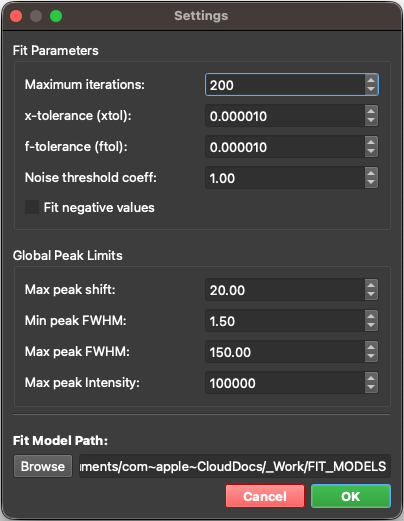
The Settings Panel is organized into two tabs:
- General — fitting behavior and file locations:
Fit Parameters,Global Peak Limits, and theSPECTROview Working Folder(sections 1–3 below). - AI — API keys, chat history, and the optional local MCP endpoint (sections 4–5 below).
1. Fit Parameters (General tab)
These parameters control the behavior of the Vectorized Batch Fit (VBF) engine — the mathematical optimizer that performs curve fitting on your spectra. Adjusting these values directly affects fitting speed, precision, and convergence.
| Parameter | Setting | Default | Range | Description & Behavior |
|---|---|---|---|---|
| Maximum Iterations | max_ite |
200 | 1 – 10,000 | The maximum number of Levenberg-Marquardt iterations per spectrum. • Lower (50–100): Faster fitting for previews. • Higher (200+): Better convergence for complex spectra. |
| x-tolerance | xtol |
1×10⁻⁴ | 1×10⁻⁶ – 1×10⁻¹ | Relative tolerance for the parameter step size. Convergence requires: mean(|δp| / |p|) < xtol |
| f-tolerance | ftol |
1×10⁻⁴ | 1×10⁻⁶ – 1×10⁻¹ | Relative tolerance for the cost function. Convergence requires: |costn - costn-1| / |costn| < ftol |
| Noise Threshold Coefficient | coef_noise |
1.0 | 0 – 100 | Multiplier for the auto-estimated noise level (coef_noise × estimated noise amplitude). Masks noisy data and suppresses ghost peaks.• 0: Disabled • 0.5–1.0: Conservative • 1.0–2.0: Moderate (Default) • 3.0+: Aggressive Note: You can refer to the noise level displayed in the toolbar or activate the "Show noise level" checkbox within the View Options of the SpectraViewer to see the noise level directly on the spectra plot. |
| Loss Function | loss |
linear |
linear, soft_l1, huber |
Robust loss function for outlier resistance (e.g. cosmic ray spikes, sharp artifacts). • linear: Standard least squares (default). • soft_l1: Smooth L1 approximation \(\rho(z) = 2(\sqrt{1+z}-1)\), robust to large spikes without manual masking. • huber: Huber loss, quadratic for inliers and linear for residuals exceeding f_scale. |
| Loss Scale | f_scale |
1.0 | 1×10⁻⁴ – 10,000 | Margin scale between inliers and outliers for robust loss functions. Residuals are scaled as \((r / f\_scale)\) before evaluating \(\rho'(z)\). |
| Fit Negative Values | - | Unchecked | - | When checked, negative intensity values are included in the fit. When unchecked, they are assigned zero weight. |
Note: A spectrum is considered converged only when both
xtolandftolcriteria are simultaneously satisfied.Weighting Composition Order: Hard exclusions (
fit_negativeandcoef_noisenoise-floor masking) are evaluated first to assign zero weight to excluded points. For active points, robust loss weighting (soft_l1orhuber) is applied second, smoothly down-weighting outlier residuals via Iteratively Reweighted Least Squares (IRLS).
2. Global Peak Limits (General tab)
These parameters define absolute boundary conditions that are applied globally to all peaks across the application. When you add a new peak to a fit model, these limits are used to set the initial parameter bounds automatically.
Note: You can check the "Limits" checkbox under the
PeakTableto display the actual bounds of each peak.
| Limit | Default | Range | Description & Constraint |
|---|---|---|---|
| Max Peak Shift | 20 | 0 – 100 | Maximum allowed displacement of a peak center (x0) from its initial value. x0 - maxshift ≤ x0fitted ≤ x0 + maxshift |
| Min Peak FWHM | 0.1 | 0.01 – 500 | Minimum allowed Full Width at Half Maximum (FWHM). Prevents peaks from collapsing into delta-function artifacts. |
| Max Peak FWHM | 200 | 1 – 1,000 | Maximum allowed FWHM. Prevents peaks from broadening into flat baselines. |
| Max Peak Intensity | 100,000 | 1 – 1×10⁹ | Upper bound for peak amplitude. Prevents unrealistically high intensity values. |
3. SPECTROview Working Folder (General tab)
Specify a single root folder for all of SPECTROview's saved templates. When you set it, three subfolders are created automatically inside it:
| Subfolder | Contents |
|---|---|
fit_model/ |
Custom fit models (JSON). The Fit Model Builder scans this folder and lists every model here for one-click reuse. |
plot_recipe/ |
Plot Recipes — saved sets of full plot configurations (data bindings + style) for the Graphs workspace. |
plot_style/ |
Style Templates — saved appearance-only styles that can be applied to any existing graph. |
Click Browse to select a folder, or type the path directly.
Note: This single Working Folder replaces the older separate "Fit model folder" / "Plot template folder" settings. If you had one of those configured previously, it is migrated automatically the first time the Working Folder is read.
4. AI Settings (AI tab)
The AI tab configures the AI Chat Agent. Nothing here is required to use the rest of SPECTROview.
API Keys
The fields for a Custom (OpenAI-compatible) endpoint are shown by default:
| Field | Description |
|---|---|
| Custom API Key | The API key for your custom / internal endpoint. |
| Base URL | The endpoint's OpenAI-compatible root URL (e.g. https://host/v1). |
| Model Name | A comma-separated list of model names (e.g. model-a, model-b). These populate the model dropdown in the chat panel — handy for endpoints that don't expose a model-listing API. |
Keys for the built-in cloud providers are tucked under the collapsible ▸ Other cloud providers section (click to expand): OpenAI, Anthropic, Gemini, DeepSeek, and Mistral. All keys are stored masked and remembered between sessions.
Where your keys are stored. API keys go into your operating system's per-user settings store — the registry (
HKEY_CURRENT_USER\Software\CEA-Leti\SPECTROview) on Windows,~/Library/Preferenceson macOS. They are never written to a file inside the SPECTROview project folder, are not included in an exported workspace, and cannot be committed to a Git repository by accident. They are stored in plain text there, so treat them like any other saved credential: they are readable by anything running under your user account.
Chat History
| Field | Description |
|---|---|
| History Folder | Where AI chat conversations are saved (as JSON). Click Browse to choose a folder. |
5. Local MCP Server (AI tab)
Enable this only when a trusted MCP client on the same computer needs access
to the currently running SPECTROview session. The default endpoint is
http://127.0.0.1:8765/mcp and starts as soon as you select OK.
| Field | Default | Description |
|---|---|---|
| Enable local MCP endpoint | Off | Starts/stops the embedded MCP server. |
| Port | 8765 | Local Streamable HTTP port (1024–65535). Choose another if the port is busy. |
The bind address is fixed to localhost (127.0.0.1); it is not exposed to the
LAN or internet. Keep SPECTROview running while the client is connected. The
endpoint stops when SPECTROview closes or the checkbox is cleared.