Installation
Installation
SPECTROview requires Python 3.8 – 3.12 and runs on Windows, macOS, and Linux. It can be installed and managed entirely from your system's command-line interface (e.g., Command Prompt or PowerShell on Windows, or Terminal on macOS/Linux).
1. Install from PyPI (Recommended)
The simplest way to install SPECTROview is from the Python Package Index (PyPI):
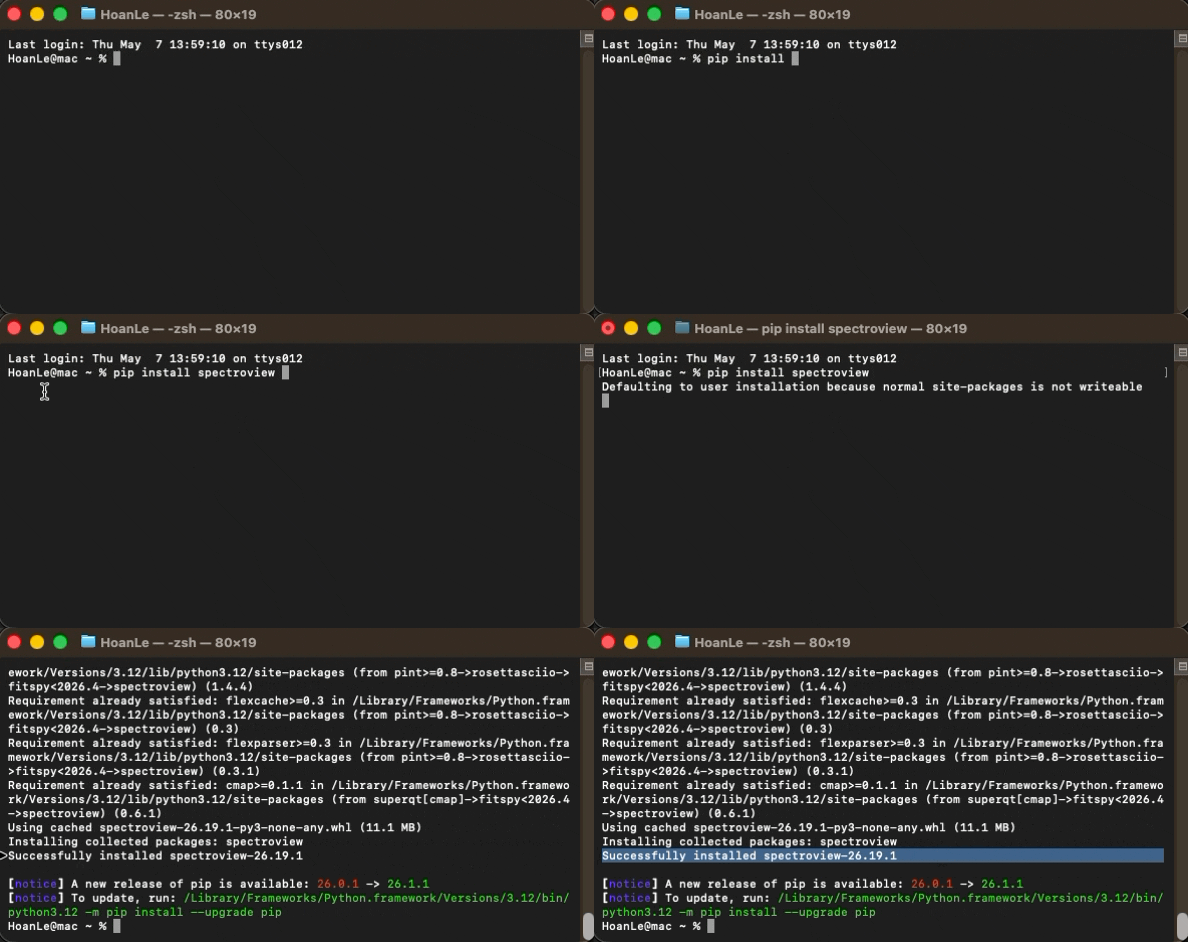
Successfully installing SPECTROview via pip.
Note: On systems where both Python 2 and Python 3 are installed, use
pip3instead ofpip:
2. Install from GitHub (Latest Development Version)
To install the latest development version directly from the source repository:
This installs the most recent code from the
mainbranch, which may include features and fixes not yet published on PyPI.
3. AI Chat Agent & Optional Voice Dictation
SPECTROview includes a built-in AI Chat Agent that allows you to query and visualize data using natural language. All the packages it needs (ollama, openai, anthropic, mcp, truststore) are installed automatically as part of the standard pip install spectroview — no extra step is required.
- For local AI (Ollama): also install Ollama itself on your system (the Python
ollamapackage alone only talks to a running Ollama service). - For Cloud AI (OpenAI, DeepSeek, Gemini, Anthropic, or a custom OpenAI-compatible endpoint): just configure your API key / base URL in Settings → AI.
- For Voice Dictation (Microphone button): this remains optional —
pip install SpeechRecognition pyaudio. If these are not installed, the microphone button still appears but shows an install instruction when clicked.
4. Launch SPECTROview****
Once installed, open your terminal or command prompt and run:
The application window will open automatically.
5. Update & Version Management
To update SPECTROview to the latest release:
To install a specific version (e.g., 26.29.3):
To check which version is currently installed:
6. Automatic Update Notifications
SPECTROview automatically checks for new releases on startup and notifies you with a non-intrusive banner at the top of the application window — no manual checking required.
How it works
- On startup, a background thread silently queries the GitHub Releases page for the latest version.
- If a newer version is available, a blue notification banner appears at the top of the window:
🔔 A new version of SPECTROview is available: 26.29.0 [ ⬇ Update ] [ 🔍 Show changelog ] [ Update later ] [ Skip this version ]
Privacy Guarantee: This check only sends a standard anonymous request to the public GitHub API to fetch the latest version number. Absolutely no personal or usage data is collected or transmitted.
Banner actions
| Button | Behaviour |
|---|---|
| ⬇ Update | Downloads the .whl attached to the announced GitHub release, verifies its SHA-256 checksum when GitHub provides one, closes SPECTROview, runs pip install --upgrade with that wheel, and relaunches the app. |
| 🔍 View changelog | Opens the GitHub release page in your browser to see what's new. |
| Update later | Hides the banner for the current session only. It will reappear on the next launch if the update is still available. |
| Skip this version | Hides the banner permanently for that specific version. It will not show again until an even newer version is released. |
Offline users: If SPECTROview is installed on a machine without internet access, the update check fails silently — the application starts and works exactly as normal. No error is raised.
Standalone executable users: Automatic updates apply to SPECTROview installations made with
pip. A standalone executable cannot install a Python wheel, so use the release page to download a newer executable instead.
7. Troubleshooting
pip: command not found
This means pip is not on your system's PATH. Try one of the following:
Or, if you have multiple Python versions installed:
Permission denied / Access is denied
You may not have write permission to the global Python site-packages directory. Use the --user flag to install for your user only:
Alternatively, use a virtual environment (recommended):
PySide6 fails to install or qt.qpa.plugin: Could not load the Qt platform plugin
PySide6 is the GUI framework used by SPECTROview. If you encounter issues:
- Ensure you are using Python 3.8 – 3.12. PySide6 does not support Python 3.7 or older.
- On Linux, you may need to install system-level Qt dependencies:
- Try reinstalling PySide6 separately:
spectroview command not found after installation
The spectroview command-line entry point may not be on your PATH. Try launching it as a Python module instead:
If you installed with --user, ensure your user's local bin directory is on your PATH:
- macOS/Linux: Add
export PATH="$HOME/.local/bin:$PATH"to your~/.bashrcor~/.zshrc. - Windows: The user scripts directory is typically
%APPDATA%\Python\PythonXX\Scripts.
numpy or matplotlib version conflict errors
SPECTROview requires numpy < 2.0.0 and matplotlib >= 3.6.2, < 3.10.9. If you see version conflict errors, try installing in a clean virtual environment:
python -m venv spectroview_env
source spectroview_env/bin/activate    # macOS/Linux
spectroview_env\Scripts\activate       # Windows
pip install spectroview
This avoids conflicts with other packages in your global Python installation.
The application opens but the window is blank or crashes immediately
This is typically a GPU/driver issue with Qt's rendering backend. Try disabling hardware acceleration:
- Windows: Set the environment variable before launching:
- macOS/Linux: